


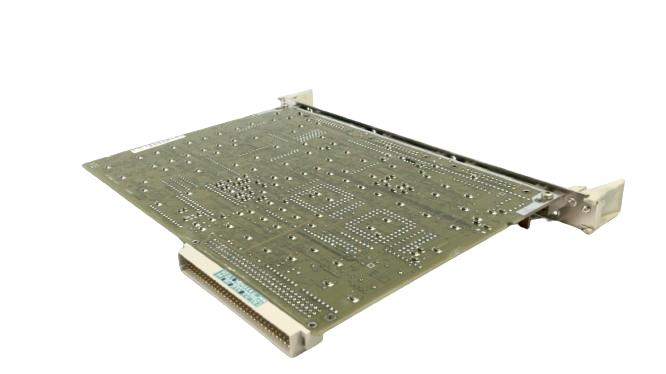
The Siemens part number 6FX1121-4BB01 is a specific component used in industrial automation systems, particularly in the field of process control and monitoring. Here's a breakdown of the key aspects related to this part number:
Technical Specifications
The Siemens 6FX1121-4BB01 is a type of digital input module designed for use in Simatic S7-300 and S7-400 controllers. It provides four digital inputs, each with a voltage range of 24 V DC, and is suitable for use in a variety of industrial environments. The module is designed to operate within a temperature range of -20°C to 60°C and has an operating voltage of 24 V DC. It also has a power consumption of approximately 1.5 watts.
Alarm/Error Codes
The digital input module 6FX1121-4BB01 does not have specific alarm or error codes associated with it. However, it can trigger alarms or errors in the controller based on the status of the digital inputs it monitors. For instance, if an input is faulty or out of range, the module may send a signal to the controller to trigger an alarm or error.
User Manuals
The user manual for the Siemens 6FX1121-4BB01 can be found on the Siemens website or through the documentation provided with the module. The manual covers installation, configuration, and troubleshooting procedures for the module.
Troubleshooting
Troubleshooting the 6FX1121-4BB01 typically involves checking the digital inputs for proper connection, ensuring that the module is correctly configured in the controller, and verifying that the power supply is adequate. Common issues include faulty inputs, incorrect wiring, or issues with the module's configuration in the controller.
Programming
The programming of the 6FX1121-4BB01 involves configuring the digital inputs in the controller to monitor specific signals or conditions. This can be done using Siemens' programming software, such as Simatic Manager or WinCC. The module can be programmed to trigger alarms or errors based on the status of the digital inputs, and it can also be used to monitor and control other devices in the system.
Installation
The installation of the 6FX1121-4BB01 typically involves connecting the module to the controller and configuring the digital inputs. This includes ensuring that the module is properly powered and that the inputs are correctly wired to the devices they are monitoring. The module should be installed in a location that is easily accessible for maintenance and troubleshooting purposes.
In summary, the Siemens 6FX1121-4BB01 is a digital input module designed for use in industrial automation systems. It provides four digital inputs and can be used to monitor and control devices in a variety of industrial environments. The module can be programmed to trigger alarms or errors based on the status of the digital inputs, and it can also be used to monitor and control other devices in the system.
Download the Data Sheet Go to product