


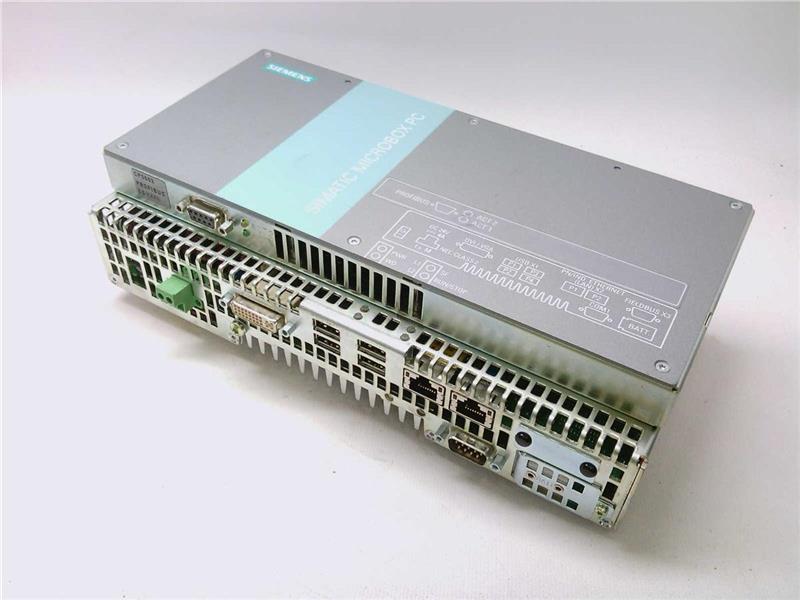
The Siemens part number 6ES7647-7BB20-2XM0 is a programmable logic controller (PLC) module designed for industrial automation applications. This module is part of the S7-200 series, which is a family of compact and versatile PLCs used in various industries such as manufacturing, process control, and building automation.
Technical Specifications:
- CPU: The module features a Siemens S7-200 CPU 200, which is a 16-bit microprocessor with a clock speed of 24 MHz.
- Memory: The PLC has 64 KB of program memory and 2 KB of data memory.
- Communication: The module supports various communication protocols including PROFIBUS, PROFINET, and RS-232.
- Input/Output: It has 24 digital inputs and 16 digital outputs, making it suitable for controlling and monitoring various devices in industrial automation systems.
Alarm/Error Codes:
- Error Codes: The PLC module can generate error codes in case of malfunctions or incorrect programming. These error codes are displayed on the module's display screen and can be accessed through the programming software.
- Alarm Codes: The module also supports alarm functions, which can be programmed to trigger specific actions based on certain conditions. Alarm codes are used to identify the specific alarm condition and can be accessed through the programming software.
User Manuals:
- Programming Manual: The user manual for the Siemens S7-200 PLC series provides detailed information on programming the PLC, including programming languages, data types, and programming examples.
- Operating Manual: The operating manual covers the basic operation and configuration of the PLC module, including setting up communication protocols and configuring inputs and outputs.
Troubleshooting:
- Troubleshooting Guide: Siemens provides a troubleshooting guide for the S7-200 series, which includes common issues and solutions, as well as troubleshooting procedures for specific modules like the 6ES7647-7BB20-2XM0.
- Error Code Reference: The error code reference guide provides detailed information on error codes generated by the PLC module, including causes, symptoms, and solutions.
Programming:
- Programming Software: The Siemens SIMATIC STEP 7 programming software is used to program the PLC module. The software provides a graphical interface for creating and editing programs, as well as debugging and testing functions.
- Programming Languages: The PLC module supports various programming languages including Ladder Logic, Function Block, and Structured Text.
Installation:
- Mounting: The PLC module is designed to be mounted in a standard 35 mm DIN rail enclosure, making it easy to integrate into existing industrial automation systems.
- Power Supply: The module requires a power supply of 24 V DC, which is typically provided by a power supply unit (PSU) or a DC power source.
- Cable Connections: The module has various cable connections for communication, power, and input/output signals, which need to be connected according to the specific application requirements.